


Norton Family Parental Control
3.22.48K Reviews
App Specs
- Version
- 7.9.6.25
- Updated On
- License
- Free
- Downloads
- 1,000,000+
- Developer
- NortonMobile
- Categories
- Parenting
- Platform
- Android
Screenshots


 Analysis by AppCompare
When I look at Norton Family Parental Control, I see a parenting app built around one practical problem: keeping a child’s online time from quietly taking over the day. I tested it with that narrow purpose in mind rather than treating it as a general phone-management tool. The result is a useful but imperfect companion for families who want more structure around connected devices without turning every conversation into an argument about screen time.
The app comes from NortonMobile and is free to use. It sits in the parenting category, carries an Everyone age rating, and has passed the point where it feels like a brand-new experiment: it was released on February 1, 2012, and its current version is 7.9.6.25. Its long history is reassuring, although the average rating of 3.2 from around 27 thousand ratings suggests that the experience is not equally smooth for every family.
Managing online time is the central idea
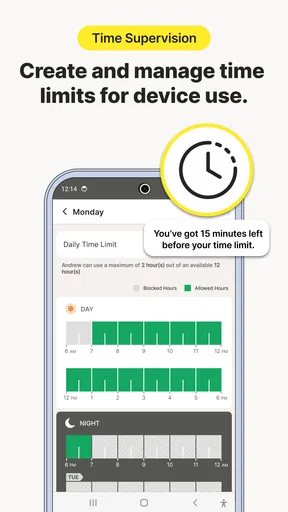
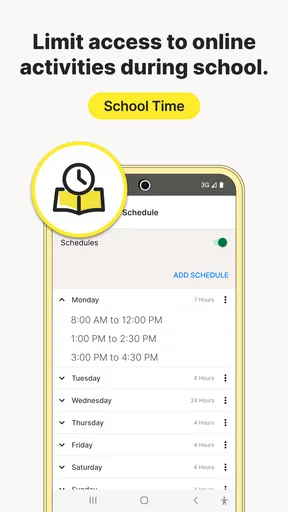
The most important capability here is not simply seeing that a child is online. It is helping a parent put boundaries around when online activity fits into the family routine. That distinction matters. A report that only tells me a child spent too long on a device is useful after the problem has happened. A time-management tool is more useful before bedtime, homework, meals, or school preparation have already been disrupted.
In my experience, this kind of control works best when I treat it as a schedule aid rather than a punishment button. The app can support a clear household agreement: recreational device use happens during certain parts of the day, while schoolwork, sleep, and family time have priority. That makes the conversation more concrete. Instead of saying “you are always online,” I can discuss the agreed routine and whether it is still working.
That approach also reveals the app’s main limitation. Norton Family cannot replace a parent’s judgment or a calm explanation. If the rules are introduced suddenly, or if adults in the same household apply different standards, the technology can become another source of conflict. I would set expectations first, then use the app to make those expectations easier to follow.
The service has attracted over one million installs, which tells me it is familiar enough to be considered by families looking for an established name. Still, popularity should not be confused with a perfect fit. A large user base does not remove the need to check whether the app suits the child’s age, device habits, and level of independence.
Why time limits are more useful than constant checking
Many parents begin with the urge to monitor everything. I understand that instinct, especially when a child is young or has recently started using a personal device. But constant checking can create a tiring routine for both sides. A time-focused approach is easier to maintain because it concentrates on a visible behavior: how long online activity is allowed to continue during the day.
Worth Reading Before You Choose

EA SPORTS FC Mobile 26 Is a Bigger Football Game, but It Takes Time

Flipboard Shows What News Apps Must Do Beyond the Feed

Switching to Android Auto Means Rethinking Your Driving Routine

Google Calendar Makes a Crowded Week Easier to Manage

Ludo King Makes the Most of the Minutes Between Plans

Baby Panda World Brings Quick Play to Modern Phones, but Its Game Library Feels Busy
I found the strongest value in using the app to move responsibility gradually from the parent to the child. At first, the adult may need to explain every boundary. Later, the child can learn to plan around it, such as finishing an assignment before leisure time or stopping an online activity before the evening routine begins. The app provides structure, but the long-term goal is better self-management.
This is also where the free price changes the decision. Families can try Norton Family without adding a subscription charge to the household budget. That makes it easier to see whether the routines are genuinely helpful. I would not install it on every family device automatically, though. I would first identify the specific problem—late-night use, distracted homework, or unplanned browsing—and judge the app against that problem.
What using it feels like in a normal week
In a realistic household, the parent’s work is not finished after installing the app. The useful part is the planning around it. I would begin by agreeing on a small number of rules instead of trying to control every minute. For example, the family might protect school preparation and bedtime, then leave a predictable window for entertainment. The fewer rules there are, the easier they are to explain and adjust.
A practical routine is to review the child’s week at a calm time, not during an argument. If the child regularly reaches the boundary while completing legitimate schoolwork, that is a sign the arrangement needs refinement. If the child is using online time mostly late at night, the family may need a stronger bedtime routine rather than simply tighter daytime limits. The app helps reveal where the pressure is, but it does not decide the right response for me.
One non-obvious benefit is that time management can expose a mismatch between the parent’s intention and the child’s actual day. A rule that sounds reasonable in the morning may be unrealistic after sports, homework, chores, and family commitments. I would use the app as a feedback loop: set a manageable boundary, observe how it affects the week, and revise it with the child rather than treating the first setup as permanent.
The family scenario where it makes the most sense
The clearest use case is a household with a school-age child who has begun stretching device time beyond what the family agreed. Imagine a child finishing schoolwork, starting a video or game, and then continuing until a parent has to interrupt bedtime. The issue is not necessarily that every activity is unsafe. The issue is that the device has become the loudest part of the evening.
In that situation, I would use Norton Family to support a predictable online routine. The child knows in advance when recreational use is expected to end, and the parent does not have to negotiate from zero every night. If the child complains, the discussion can focus on the schedule rather than on whether the parent is being unfair in that particular moment.
This scenario is especially suitable for children who respond well to clear boundaries but struggle to stop independently. It is less suitable when the main concern is a complex safety investigation, a serious behavioral issue, or a need for highly specialized supervision. Time control can reduce friction, but it is not a substitute for direct communication, family rules, or professional help when a deeper problem is involved.
Another useful scenario is the transition to a first personal device. Parents often want to encourage independence while still protecting sleep and school routines. Starting with transparent limits is healthier than waiting until habits become entrenched and then imposing a sudden crackdown. I would explain what the app is doing, what the boundaries are for, and how the child can earn more independence through responsible use.
Small workflow choices that make a difference
My first practical tip is to avoid changing several rules at once. If I alter the schedule, add new restrictions, and begin checking every report simultaneously, I will not know which change helped. A better workflow is to focus on the central time problem, observe the household response, and only then decide whether more supervision is needed.
My second tip is to use the app alongside a visible family routine. A digital boundary is easier to accept when it matches real-world cues such as dinner, reading, preparing for school, or getting ready for sleep. Without those cues, the child may experience the rule as an arbitrary shutdown. The strongest results come when the technology reinforces a routine the family already understands.
My third tip is to leave room for legitimate exceptions. Homework, travel, family calls, and other necessary online activities do not always fit a simple leisure schedule. I would discuss exceptions before they are needed and make sure the child knows how to ask for one. A rigid system may look tidy in settings but become frustrating in daily life if it cannot accommodate normal changes.
A fourth insight is that the parent should review the arrangement from the child’s perspective. If the boundary ends in the middle of a reasonable activity every evening, the app may technically be enforcing the rule while practically encouraging resentment. The right question is not only “Did the limit work?” but also “Did the limit teach a better habit?” That distinction helps prevent the tool from becoming a recurring source of conflict.
The tradeoff between structure and family trust
Parental-control apps always involve a tradeoff. More structure can make routines easier, but more oversight can also make a child feel watched. Norton Family is most convincing when I use it openly and explain its role. Secret monitoring may produce short-term information, but it weakens the trust that parents are trying to build over the longer term.
I would also be careful about assuming that an app can solve every form of distraction. A child may stop using one device and move to another, or may spend permitted time in a way that still interferes with family life. The time boundary is valuable, but the household still needs conversations about content, priorities, and respectful behavior. The app should be one part of the plan, not the entire plan.
The rating of 3.2 is worth considering before installation. It does not tell me exactly why each person was disappointed, but it is a useful reminder to keep expectations realistic. Families should be prepared for some setup friction and should test the arrangement with their own devices and routines rather than assuming that a familiar Norton name guarantees a seamless experience.
There is also a tradeoff between simplicity and depth. A focused time-management approach is easier for a busy parent to understand than a huge collection of controls. On the other hand, parents who need very detailed customization may find a general family-management app less satisfying than a tool designed specifically for their device ecosystem or their child’s particular needs. I would choose the simpler approach when the problem is mainly excessive online time, not when the family needs a broad digital-safety strategy.
Questions I would settle before installing
One question parents often have is whether the app is appropriate for younger children. Its Everyone content rating makes it broadly accessible as an app, but suitability still depends on the family’s parenting approach and the child’s maturity. I would introduce it with an explanation, not as a hidden surveillance measure, and I would revisit the rules as the child becomes more independent.
Another question is whether it can help with bedtime. It can support a bedtime boundary by making the intended end of online activity clearer, but it cannot create a complete sleep routine on its own. I would combine it with charging devices away from the bed, a consistent wind-down period, and a conversation about why sleep matters. If the child is using several devices, the family must also make sure the overall routine covers the devices that actually cause the problem.
Parents may also wonder whether the free price means it is worth trying even if they are unsure. In my view, yes, provided the goal is specific. I would try it when the household needs help managing online time and is willing to participate in the setup. I would skip it if nobody is prepared to discuss rules, review the results, or follow through consistently, because no parental-control app can compensate for absent follow-through.
Finally, some readers will ask whether this is better than relying on built-in phone controls. The answer depends on the household. Built-in controls can be convenient when every device belongs to the same platform and the parent wants the fewest moving parts. Norton Family is more appealing when a recognizable parenting-focused app fits the family’s preferred workflow. I would compare the two by testing which one makes the rules easiest to explain and maintain, not by choosing the one with the longest feature list.
Who benefits most from this approach
I think Norton Family is best for parents who want a calmer way to manage online time, especially during the transition from shared devices to a child’s own device. It is a sensible option for families dealing with repeated bedtime delays, homework distraction, or endless negotiations over when recreational use should finish. The free price lowers the risk of trying it, and its long availability makes it feel less experimental than a newly launched parenting tool.
It is not my first choice for parents who want highly specialized monitoring, a completely automatic solution, or a tool that can replace family conversations. It is also a poor fit for households that expect to install an app once and never revisit the rules. The best results require a little planning, transparency, and willingness to adapt.
Overall, I see Norton Family Parental Control as a practical time-management aid rather than a magic shield for every online risk. Its strongest contribution is helping turn vague concerns about screen use into a routine that a parent and child can discuss. Its weaknesses appear when expectations become too broad or the family wants technology to make every parenting decision.
With the current version 7.9.6.25 and support for Android 8.0 and later, I would recommend checking device compatibility before setting up a household plan. If your main challenge is controlling when children spend time online, this app is worth a careful trial. If your needs go beyond time management, compare it with the controls already built into your devices and choose the option that gives your family clear rules without damaging trust.
Pros
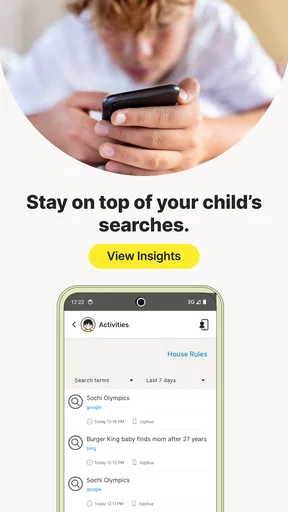
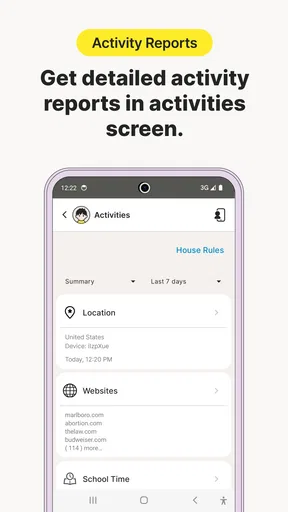
- Clear activity reports help parents understand children’s online habits.
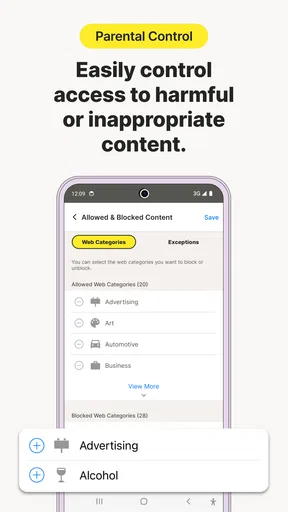
- Web supervision can block or warn about unsuitable sites.
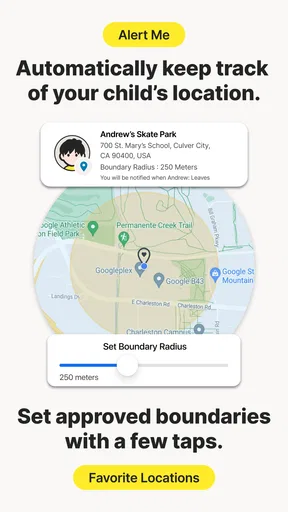
- Location tracking adds reassurance for families with mobile children.
- Custom rules can be adjusted for different children and age groups.
- Works across Android
- iOS
- Windows
- and other supported platforms.
Cons
- Some features require a paid Norton Family subscription.
- Older children may find monitoring intrusive or restrictive.
- App controls and features can vary between Android and iOS.
- Location tracking may use extra battery and mobile data.
- Children can sometimes bypass limits using unsupported browsers or devices.
FAQs for Norton Family Parental Control
What is Norton Family Parental Control and who is it designed for?
Norton Family Parental Control is a monitoring and safety app designed to help parents supervise how children use connected devices. It can provide insight into web activity, search behavior, app usage, screen time, and location features, depending on the child’s device and the subscription plan. It is mainly intended for families who want guidance and visibility rather than completely blocking independent device use.
Which devices and platforms are compatible with Norton Family?
Norton Family generally supports Android and iOS mobile devices, as well as compatible Windows computers, but the available features are not identical on every platform. Some controls may work more extensively on Android or Windows than on iPhone and iPad because of Apple’s system restrictions. Before downloading, parents should check Norton’s current compatibility list and confirm that the child’s operating system and device model are supported.
Can Norton Family block inappropriate websites and applications?
The app can help parents filter or restrict websites according to categories, age settings, and custom rules, while also providing activity reports. However, filtering is not guaranteed to catch every unsuitable page, especially when children use private browsing, alternative browsers, VPNs, or unsupported applications. App supervision and blocking capabilities may also vary by platform, so parents should test the settings and combine them with open communication.
Does Norton Family track a child’s location and monitor messages?
Norton Family may offer location supervision on supported devices and plans, allowing parents to view a device’s reported location or use related safety features. Location accuracy depends on GPS, Wi-Fi, mobile networks, permissions, and battery settings. Parents should not assume that the service records every text message or private conversation; monitoring capabilities are limited by operating-system rules and should be reviewed carefully before installation.
Is Norton Family free, and what should parents know about privacy and setup?
Norton Family may include a trial or limited access, but many of its useful monitoring and scheduling tools normally require a Norton subscription. Setup usually involves installing a parent profile and a child profile, granting permissions, and configuring rules for each device. Because the app collects information about children’s digital activity, parents should read the privacy policy, explain the monitoring clearly, protect account credentials, and review permissions regularly.


